OCT_MMXXVI

The Morning Build

BETTER.CI ↗
Vol I

You deserve better CI. Obviously, from Buildkite.

$Free

San Francisco Tech Week exclusive

CI IS DEAD.LONG LIVE CI.

Dispatches from the people building what’s next.Vol. I / October 2026
Engineering optimizationFrom the print edition / 02, 05–06

Reddit cuts mobile CI build times by up to 50% on Buildkite

Reddit’s Snoo mascot, rendered in halftone dots
Faster, leaner, and a lot less YAML.
Faster build times for Android and iOS
50%
Lines gone; YAML bloat to reusable pipeline steps
6,000
Wasted runs
0

By early 2024, Reddit’s mobile engineering team, more than 200 developers strong, had reached the operational limits of its existing CI system. Build queues stretched into minutes during peak activity. YAML configuration files ballooned, making changes time‑consuming and error‑prone. Concurrency limits throttled build throughput, while environment drift and dependency instability further eroded velocity and developer satisfaction.

Despite extensive custom tooling, inefficiencies persisted. Queue delays led to wasted developer time. Orchestration complexity increased the risk of failures. The inability to scale cost‑effectively meant that supporting growing feature demands could quickly become prohibitively expensive. “There were just so many different points of failure, and we would get hit all the time, because we were hammering the services with our scale,” said Geoff Hackett, Staff Android Engineer, Android Platform Team, at Reddit.

The Reddit leadership team recognized that incremental optimizations were no longer enough; they needed a CI platform that could match the scale, pace, and complexity of Reddit’s mobile codebase. The solution would have to integrate seamlessly with Kubernetes infrastructure, offer robust caching, improve configurability, and eliminate the roadblocks slowing iOS and Android delivery.

At Reddit’s mobile engineering scale, developer velocity was directly gated by the capabilities of its CI platform. “The primary issue was that we kept running up against our concurrency limits,” said Hackett. “We were not able to control our build environment, so we didn’t have the ability to even use a custom Docker image.”

This forced the Mobile Client Platforms team to maintain a fragile ecosystem of workarounds, including running a second CI system purely to handle build cancellations, building custom retry bots to patch over flaky runs, and heavily sharding YAML configurations to work around platform constraints.

The cumulative effect was long feedback cycles, brittle pipelines, and an ever‑growing maintenance tax on the platform and release engineering teams.

To sustain product momentum for millions of mobile users, Reddit’s engineering leaders set stringent functional requirements for any replacement. The next system required first-class integration with Bazel and BuildBuddy, enabling iOS to utilize high-performance remote execution.

Teams required full control over build environments, from Docker images to scripts, to ensure deterministic, reproducible results. It also had to deliver a clean developer experience, enabling pipelines to evolve dynamically without rewriting thousands of lines of YAML. It also needed hybrid hosting options that passed internal security and governance reviews for secrets handling and runner controls.

The business case was straightforward but compelling. A faster, more flexible CI system would unlock engineering autonomy and drastically shorten iteration loops.

If queue times could drop from minutes to seconds, if builds could speed up significantly, and if the complexity of sprawling, hard‑to‑maintain configurations could be eliminated, the result would be a happier and more productive developer base. Achieving this without increasing spend would mean not just a technical win, but a cost‑neutral transformation of Reddit’s ability to deliver high‑quality mobile features at the pace its users expect.

Reddit’s mobile CI overhaul began with a rigorous evaluation of ten different platforms, including Buildkite, GitHub Actions, TeamCity, and Drone.

After months of research, prototyping, and side-by-side trials, Buildkite emerged as the solution best aligned with Reddit’s scale, Kubernetes-first infrastructure, and need for developer-friendly pipelines.

Buildkite’s runtime‑generated, composable pipelines were a notable breakthrough. “Our configuration had gotten out of hand,” said Hackett. “We had like 6,000 lines of YAML that we eventually split across multiple files.” Instead of hard‑coding dozens of shards, engineers now define a small “seed” step in Buildkite that emits YAML dynamically at runtime.

Using clean, maintainable logic written in Python or a similarly familiar language, they can compose reusable units on the fly, eliminating duplication and making structural changes without mass edits across multiple files. This replaced brittle, hard‑coded orchestration with elegant, evolvable logic that scales smoothly with team needs.

For compute, Reddit deployed a hybrid approach that blends Buildkite’s high‑performance hosted agents with powerful Linux runners for remote execution. By tightly integrating with Bazel and BuildBuddy, both iOS and Android pipelines now run efficiently in a Linux environment, without the complexity or cost of bespoke Mac infrastructure for most stages.

This architecture not only improves performance but also reduces operational dependencies, allowing teams to iterate on pipelines faster. “The decision was actually made for us when we decided we weren’t ready to host our own builders,” said Hackett. “Buildkite was the only option that gave us the flexibility to use the same system for hosted and on-prem builders, while improving the developer experience.”

Buildkite also restored full control and extensibility to engineers. Teams can now build custom Docker images, manage dependencies deterministically, and leverage an approachable plugin model based on simple Bash scripts, steering clear of opaque vendor “actions” or rigid platform constraints. This results in predictable, reproducible environments and faster onboarding for new engineers modifying pipelines.

Performance‑critical primitives have been another driver of Reddit’s success with Buildkite. “Buildkite’s dynamic pipelines, Git caching, and container caching were game changers,” said Ken Struys, Director of Developer Experience at Reddit. “Git checkouts dropped from minutes to under 40 seconds.”

Intelligent build cancellation automatically terminates obsolete builds when new commits land, cutting wasted concurrency and keeping CI throughput high. Log decoration and timing controls give developers clearer insight into failures, with rich formatting, clickable links, and visual cues improving debuggability and reducing time‑to‑fix. “Adding a new timed section to a build is as simple as echo '--- A section of a build',” said Hackett. “You can even add colors, images, clickable links and emojis to really customize your log output with some simple decorations."

The rollout was handled through a staged migration with “shadow builds”. Buildkite pipelines were run in parallel to the existing production system, allowing for side‑by‑side validation of performance and stability without risking mobile release schedules.

To support this, Buildkite’s own engineering team developed a GitHub App for Reddit’s GitHub Enterprise Server instance and provided hands‑on guidance via Slack throughout the project. “We’ve had a support channel set up with them since day one, and their team is always responsive,” said Hackett. “When we have questions, they’ve all been really quickly resolved, and they’ve been super transparent about causes and solutions.”

Onboarding the 200+ developers was also extremely straightforward. “Teaching people Buildkite was easier than we expected,” said Hackett. “We were able to write up a couple of wikis, and, for the most part, that did it. Everybody could really self-run once they understood the basics, because at the end of the day, we’re all just writing Bash scripts.”

Despite the scale, with two large mobile monorepos and more than 200 engineers, the core implementation was led by just two engineers, one for iOS and one for Android. Within a few months, the migration shipped ahead of schedule, without a major service disruption. The new pipelines require far less YAML maintenance, while delivering faster builds, shorter queues, and more stable environments from day one. “I think we were able to get everything migrated as quickly as we were because of dynamic pipelines,” said Hackett. “Dynamic pipelines let us move really quickly and build a safer system.”

This combination of composable architecture, hybrid compute, greater control, and targeted performance optimizations have transformed Reddit’s mobile CI from a bottleneck into a competitive advantage, laying the groundwork for the substantial gains in speed, reliability, and developer experience measured after go‑live. “After about a year of evaluations, a few months of prototyping and debate and another 5-8 months of intense cross-team collaboration, we managed to migrate Reddit’s entire mobile CI system,” said Hackett. “We’ve been up and running for almost 3 months and developer sentiment of CI is sky high.”

Reddit’s migration to Buildkite delivered measurable, across‑the‑board improvements. Builds on both iOS and Android now run roughly 30% faster overall, with benchmarking showing a 33% drop at the p50 and an even steeper 47% reduction at the p90. Queue latency, once measured in minutes, has fallen to about five seconds, and merge‑queue cycle time was slashed from ~30 minutes to ~15 minutes, significantly shortening feedback loops.

Stability saw a dramatic lift thanks to deterministic, reproducible environments, richer logging, and dynamic orchestration, which reduced flakiness and improved developer sentiment. Git checkout time shrank to 30–40 seconds, while smarter automatic build cancellations cut wasted concurrency. “Buildkite automatically cancels builds when you push to a PR through the previous commit, or to the same branch for the previous commit,” said Hackett. “All of these really simple features that we previously had to build tooling around to cancel manually to reduce costs.”

In addition, the move away from sprawling YAML files to modular pipeline steps made configuration both simpler and more maintainable. “Buildkite dynamic pipelines have enabled us to build powerful CI systems with less cruft and less code repetition,” said Hackett. “That’s big. We could do these things on other platforms, but it would take a lot more code to do it.”

Perhaps most impressively, all of these gains came without an increase in overall CI spend, resulting in a far better price‑performance ratio. For Reddit’s mobile teams, Buildkite replaced a frustrating bottleneck with a responsive, efficient, and scalable delivery platform, one that now enables faster innovation, steadier releases, and a smoother experience for both developers and users. “We’ve been able to make pretty much every process easier just by implementing Buildkite,” said Hackett. “Buildkite’s flexibility enabled us to complete this complete mobile CI migration in record time, and their superior UI/UX has made our engineers happier and more productive. The speed helps too.”

Reddit has been a customer since 2024.

End
Back to story headline ↑
Engineering war storyFrom the print edition / 02, 06

How a flaky test exposed a Redis client use-after-free

It can be hard to fix a bug even when it happens deterministically; replicating the circumstances that trigger it is often the hardest step. When a bug is non-deterministic this becomes harder: we need to execute the code that reproduces it many times in order to observe the behavior, which adds significant time to our feedback loop.

Harder still is when the cause of the bug happens prior to its manifestation, when data is corrupted but we don’t immediately notice it. Our usual tools focus on capturing the state of the system at the time a crash happens, which doesn’t tell us why the corruption happened in the first place, just that it happened.

This is the tale of a memory corruption bug we found in the redis-client library and what helped us get there.

Chapter 01: “Bounce”

Jump! Bounce! Down! Up!

Our story starts with David, an engineering manager on our Scalability team. One idle Tuesday, David saw a build of his had failed due to what appeared to be a number of flaky tests. He started a thread in Slack to alert others and included a screenshot from the Test Engine dashboard.

As a continuous integration company, we are intimately familiar with flaky tests. They are an inevitable part of any large codebase. Within 15 minutes, the team pulled the Andon Cord; these tests were so flaky they were preventing us deploying code to production. As David summarized it, “[the] priority is getting main unblocked”, so we worked to exclude the tests from our suite temporarily.

With the urgency reduced, David and the many other developers blocked by this hiccup were free to go back to their original tasks. David, though, decided to take a slightly deeper look by inspecting the reliability of these tests using Buildkite’s Test Engine reliability score, to see if he could correlate when they suddenly became unstable.

“It seems the three worst flakeys went from ~100% reliable to not around. I’ve had a look through merged PRs to see if I can spot what might have contributed to that change, but can’t see anything obvious. Only thing that jumps out is the Redis upgrade?” — David Barrell, Engineering Manager, Buildkite

That Redis upgrade was done on the prior Friday afternoon by a staff engineer, and part time blog post narrator, Patrick Robinson.

Patrick loves few things more than talking about himself in the third person; one of those things is getting deep into gnarly bugs.

Here’s our first clue: the Redis gem upgrade had gone smoothly with no hint of any production issues. At this point, though, a second hypothesis appeared: the tests were flaky because they depended on a certain sequence of events. See, the flaky tests were part of our feature test suite; they utilized not just RSpec but also a Selenium headless browser and a test environment comprising of a web/API server, database and Redis server. In these situations, race conditions between the different components are a common cause of flaky tests. Unfortunately, this would lead our investigators off track.

So the suggestion was to slap a sleep in between the test setup and assertions to see if it made the problem go away. This wasn’t a solution, but a way of establishing if the flakiness was the result of a WebSocket message taking slightly too long to arrive.

Chapter 02: “Fade to Black”

Life, it seems, will fade away Drifting further every day Getting lost within myself Nothing matters, no one else

The following Monday, more tests were failing sporadically in the same file as those that had been skipped. Patrick worked with another of our staff engineers who could, unlike Patrick, write actual frontend code. Together they managed to build a reliable reproduction of the bug, although it took up to 30 minutes to produce a failure. After eliminating the possibility of a race condition where messages were delivered after the test suite had run, the team narrowed in on the interactions between Action Cable and Redis.

By adding additional logging, they found the subscribe command was being delivered to Action Cable but wasn’t being received by Redis. Other developers also reported WebSockets often failing in development, indicating it was not only the test environment that was impacted.

At the end of the third day of debugging, seemingly getting nowhere, Patrick got a very unusual error message, which he posted to Slack with the departing words “I think it’s time to give up for the night.”

                RUBY(29632,0X2A9F1F000)
MALLOC: DOUBLE FREE OF OBJECT 0X2A9BB6740

RUBY(29632,0X2A9F1F000)
MALLOC: *** SET A BREAKPOINT IN MALLOC_ERROR_BREAK TO DEBUG
              

This kind of exception is quite unusual and hints at how deep this bug goes. But the team hadn’t quite gathered enough information to recognize how or even if it related to the failure.

Like an installment of the blockbuster movie series Knives Out, even with all the information, it still didn’t make sense.

Chapter 03: “Everlong”

Hello I’ve waited here for you Everlong

Successful debugging requires a good dose of skill and a pinch of luck. Late on the following Thursday afternoon, a message was posted in our engineering Slack channel that a build had triggered a segmentation fault. Attached to the build was a core dump.

The core dump was attached because one of our developers was previously trying to debug a crash in the test suite, and had written a plugin to look for the presence of a core dump and, if one was found, upload it to the relevant build as an artifact.

That means it’s time to introduce our third character, Rian, who during his tenure at Buildkite developed a reputation for finding and fixing incredibly obscure bugs (along with the infamous Doom pipeline). The stories are so great that despite Rian’s departure we tell them to new hires, who retell them to others and so on and so forth.

The core dump enabled Rian to inspect the state of the process at the time it crashed, akin to a black box in an aircraft crash investigation.

The crash message itself indicated it happened inside the hiredis code, which is a C extension bundled into the redis-client gem.

From this, he ascertained that the exception was triggered by a call to the C function memmove. While the source and destination addresses for this call looked sane, the size field was set to 0x00a0ffffffffffb6, which is about 45 petabytes.

Based on this and the fact we’d been seeing other unexpected behavior since upgrading the Redis gem, it was logical to conclude a memory corruption bug was present in the newest version.

By another stroke of luck, Rian had attended a conference talk earlier in the year called “Finding and fixing memory safety bugs in C with ASAN.”

With this information, Rian set to work getting the reproducible code running in a version of Ruby compiled with ASAN. It only took a couple of hours to get this running, and within 30 minutes ASAN reported a heap use-after-free. In order to provide concurrent execution, hiredis has two threads for each connection, one for reading and one for writing. The use-after-free was happening because in some scenarios the reader thread would free the writer buffer.

Epilogue: “In the End”

I’m surprised it got so far Things aren’t the way they were before You wouldn’t even recognize me anymore Not that you knew me back then, but it all comes back to me in the end

Once we knew that there was memory corruption and, more importantly, where it was coming from, fixing it was relatively straightforward. Rian disabled using the C extension for Redis connections in test, development and production, and developed a reproducible test case that was reported upstream.

What enabled us to find it in the first place is the interesting part. A combination of deliberate application of our skills in building the necessary tooling, teamwork, and just the right amount of luck. Our tools, such as Test Engine and our coredump-artifact plugin, enabled us to identify the nature of the bug and, combined with using ASAN, where it manifested. Memory corruption bugs such as these can often take months to fix, because having a core dump generated by a segfault only tells you that memory was corrupted at some point in the past, but gives you few clues as to how it became corrupt.

No production data was harmed in the making of this story.

Originally published July 2026 on buildkite.engineering.

End

Back to story headline ↑
Engineering field notesFrom the print edition / 03, 06

Designing log-navigation tools in the Buildkite MCP server

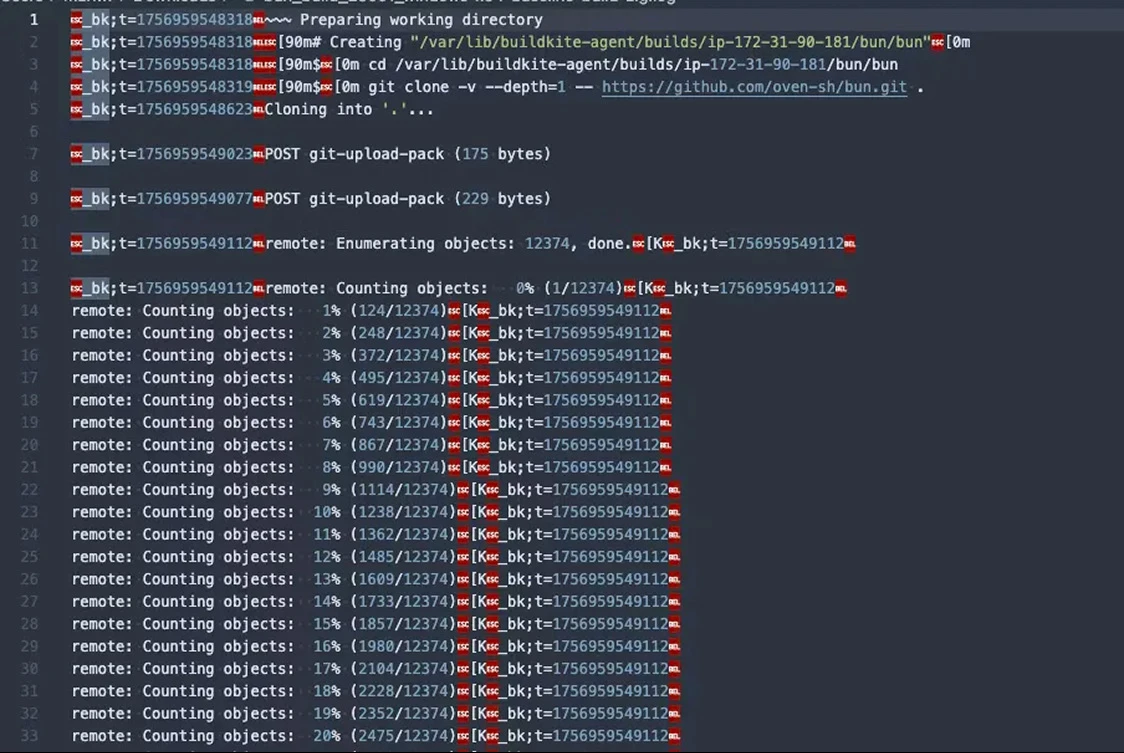
Bun’s raw Buildkite log, dense with ANSI escape codes and repeated progress output
What an agent sees. Not quite what a human reads.

When the Buildkite MCP server was originally released, we were first to market in the CI tool niche. Shortly after (later 2025), we published a high-level overview of the Buildkite MCP server and the tools it exposes.

In that post, we mentioned we’d done a lot of work around more efficient log fetching, parsing, and querying.

This expands on that by telling the full story behind how we present logs in order to make them usable by agents, especially when answering questions like “Why did my build fail?”

Background on our MCP server

When originally approaching our MCP server project, we had a few goals in mind. We wanted a simple, consistent way for AI agents to work with Buildkite, and we wanted the MCP server to use the same public REST API that our users already depend on, so it wouldn’t require a new surface area or a different permission model.

We built the MCP server in the open from day one. Customers found it, wired agents into their real pipelines, and started asking those agents questions like:

  • How does this pipeline work?
  • What is the current state of this pipeline?
  • How can I improve it?
  • Can you analyze the last 10 executions and identify any obvious issues?
  • Are there any slow steps here that could be split up, or somehow made faster?

To help AI agents answer these questions, we began by providing a set of MCP tools that simply wrapped and returned the output of our REST API. This included returning a sanitized version of our job logs. For the most part, these tools worked. However, the first issue we had was that job logs can vary wildly in response size, especially when builds fail and return pages of stack traces or verbose debug output.

Why CI logs are a challenge for AI agents

Buildkite’s job logs are composed from the raw bytestream from a pseudo-terminal (PTY).

We store the full stream because it’s the most reliable way to capture the exact sequence of events, and it allows the UI to faithfully replay whatever the job actually printed.

As a result, our logs may contain ANSI escape sequences, progress bars, lines that print and then disappear, timestamps hidden inside escape sequences, and group markers for the UI.

Raw Bun build log with ANSI escape codes, timestamps, and repeated progress updates
Screenshot of a raw build log taken from the Bun project’s public Buildkite pipeline showing ANSI escape codes and timestamps encoded into the output.

This same section gets rendered in the Buildkite dashboard, however, as a single line:

                2025-09-04 04:19:09 UTC
REMOTE: COUNTING OBJECTS: 100% (12374/12374), DONE.
              

The dashboard processes and renders the log to show only the final state, but agents working with the raw stream see every intermediate update, every line clear, every escape sequence, and so on.

Our first MCP implementation exposed this output with a simple wrapper around the API endpoint that returned the full terminal stream. However, this naïve implementation didn’t yield great results on large logs. If you give an LLM a 200MB terminal stream, it’ll usually start at the top of the stream and then fixate on the first error it encounters, completely missing the part of the log (often much later on) that actually caused the job to fail.

Our first attempt: a tail tool

Once it became clear that returning the full log wasn’t producing good results, the next idea was to give the LLM a way to fetch just the end of the log using a tail_logs tool. Engineers typically go to the end of the job log and scroll backwards through the results until the root cause is found, because the last error in a job is probably the one that caused the failure.

This helped a little, and a couple of external contributors even improved on the idea by experimenting with saving large logs to disk so the agent could run tail or grep on its own.

But this approach had its own problems, due to our requirements for Buildkite’s MCP server:

  • The MCP server needed to behave similarly in local and hosted modes. Saving logs to disk works on a developer’s machine, but not in a hosted or Dockerized scenarios. And security concerns meant that we wanted to avoid direct filesystem access anyway.
  • We couldn’t assume anything about the agent’s environment. We wanted the server to work with any type of agent: chat agents, coding agents, cloud-hosted, local, etc. Relying on the agent to be able to run tail or grep was too brittle.
  • Different agents behaved differently. This approach really left the agent to its own devices when it came to log analysis, which was good for some agents, but not so good for others.

Once we accepted that giving agents a tail_logs tool wasn’t enough, the next question was this: What does an agent actually need in order to move through a log like a human does?

Designing log-navigation tools

When you ask an agent something like “Why did build 123 fail?” there’s a pretty reasonable path you might expect it to take:

  • Look at the build status and identify any jobs that failed.
  • Tail the logs for the associated job steps.
  • Page through the logs around the failure to understand what actually broke.
  • Check for any annotations on the build that might add context.
  • Summarize what happened and point to the relevant tests, source files, or failing commands.

Humans do this naturally, but getting an agent like Claude Code or Amp to follow that path on its own can be surprisingly hard.

Building on the tail tool, we needed a small set of structured tools that made the logs addressable and let the agent read them in a controlled way.

Step 01: Make the logs navigable

First, we added a pre-processing step in the MCP server that turns the stream into a line-oriented format. It strips out the ANSI codes I mentioned above, retains lines that were printed and then cleared, pulls out timestamps, records log groups, and splits the output into clean entries. The idea is just to make the log predictable so we can index into it.

After that, we write the processed log to Parquet. In the buildkite-logs library, there’s a process that converts the parsed log lines, with some metadata extracted from the raw output, such as timestamps, into a Parquet file.

We defined a structured format for log entries with four columns:

  • timestamp:Milliseconds since epoch (Int64)
  • content: The actual log text (String)
  • group: The section/group name (String)
  • flags: Metadata flags (Int32)

This format allows reading and scanning of one or all columns, which is great for filtering or aggregating.

Here’s what the processed output looks like when queried, with each log entry as a clean, structured record:

                [
  {
    "ROW_NUMBER": 1,
    "TIMESTAMP": 1756095948319,
    "CONTENT": "PREPARING WORKING DIRECTORY",
    "GROUP": "PREPARING WORKING DIRECTORY",
    "FLAGS": 1
  },
  {
    "ROW_NUMBER": 2,
    "TIMESTAMP": 1756095948319,
    "CONTENT": "CREATING \"/VAR/LIB/BUILDKITE-AGENT/BUILDS/IP-172-31-90-181/BUN/BUN\"",
    "GROUP": "PREPARING WORKING DIRECTORY",
    "FLAGS": 1
  },
  {
    "ROW_NUMBER": 3,
    "TIMESTAMP": 1756095948319,
    "CONTENT": "$ CD /VAR/LIB/BUILDKITE-AGENT/BUILDS/IP-172-31-90-181/BUN/BUN",
    "GROUP": "PREPARING WORKING DIRECTORY",
    "FLAGS": 1
  },
  {
    "ROW_NUMBER": 8,
    "TIMESTAMP": 1756095949112,
    "CONTENT": "REMOTE: ENUMERATING OBJECTS: 12374, DONE.",
    "GROUP": "PREPARING WORKING DIRECTORY",
    "FLAGS": 1
  },
  {
    "ROW_NUMBER": 9,
    "TIMESTAMP": 1756095949112,
    "CONTENT": "REMOTE: COUNTING OBJECTS: 100% (12374/12374), DONE.",
    "GROUP": "PREPARING WORKING DIRECTORY",
    "FLAGS": 1
  }
]
              

Parquet also gives us fast random access and good compression, keeping latency low for agent calls and avoiding burning tokens.

Step 02: Discover the right tools with help from Claude

Once we had our logs in Parquet format, the main issue was figuring out what the agent actually needed to follow the correct debugging path.

We used an LLM to solve this, essentially using Claude to critique itself. We'd give an agent some logs, let it make whatever tool calls it wanted to diagnose a build failure, then feed the entire trace back into a fresh Claude session and ask it to explain where its own reasoning broke down and what additional tools or description changes would've prevented that failure. Claude is extremely blunt when reviewing its own mistakes, and it reliably pointed out missing primitives and unclear tool semantics.

After a few cycles of this Claude-auditing-Claude loop, the tool surface converged, and we ended up with four log-navigation tools:

  • tail_logs: returns the last N lines of a processed log (the starting point for most investigations)
  • search_logs: performs a regex search with optional before/after context lines
  • read_logs: reads a window of lines from an absolute row offset, forward or backward
  • get_logs_info: returns metadata about the processed log (size, total rows, available groups, etc.)

These were enough for agents to reliably reproduce the human debugging workflow without requiring us to encode that workflow directly in an LLM prompt.

What we learned

This experience has taught us a few important lessons about AI agents: it’s tempting to take your REST API, wrap it in MCP tools, and assume the model will stitch everything together on its own, but this approach is rarely the best one.

When you’re writing an MCP server, you don’t control the agent’s prompts or its overall strategy; the only leverage you have is the shape of the tools you expose. LLMs are incredibly lazy, so the goal is to make the right moves the easiest ones, rather like creating a channel for water to naturally flow downhill.

When providing information to agents, you should avoid providing noisy, ambiguous information, otherwise the analysis or summarized information will result in highly varied quality of results. To get the most out of these systems, the tricky thing is to give them just the right amount of information related to a failure or issue.

If you’d like to explore it yourself, the Buildkite MCP server is open source and available in local and fully-hosted versions. We’ve designed it to be both a useful integration layer and a reference implementation for anyone building agentic workflows on top of CI systems.

If you do use it, we’d love to hear from you. The best way to do that is by filing an issue on GitHub, and we welcome PR contributions from the community as well.

End

Back to story headline ↑
Engineering field notesFrom the print edition / 04–05

Sleeping at scale

Jitter + ticker

“Hope is not
a strategy.”

Whole-interval jitter distributes requests more evenly than half-interval jitter

One Buildkite Agent doing something once per second (like collecting new log output, splitting it into chunks and preparing them for upload) is not especially interesting.

But there are hundreds of thousands of Buildkite Agents connected and running around the world talking to our backend. If enough of them happen to do the same thing at roughly the same time, a harmless little loop becomes a large spike in work for the servers on the other end.

We need the agents to keep a regular pace without marching in step and this has turned out to involve more thought and more kinds of loops than we expected.

To understand what we’ve done to achieve this, we need to take a step back and go back to basics: one program that needs to do a thing over and over again, forever.

Doing a thing repeatedly forever

The simplest way to write that (in Go, but this is hopefully readable to everyone) is:

                for {
    doThing()
}
              

Immediately repeating the action without any sleep in between will probably cause some resource to be consumed as quickly as possible, such as CPU or network bandwidth.

So let’s add a sleep to slow things down:

                interval := 1 * time.Second
for {
    doThing()
    time.Sleep(interval)
}
              

Do the thing, sleep 1 second, repeat.

Question: In the code above, is doThing called exactly once every second?

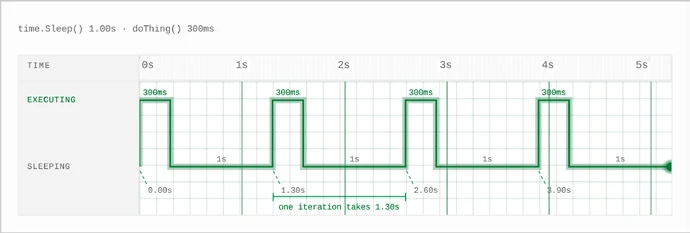
A one-second sleep plus work duration makes each loop longer than one second.

Answer: No. Aside from the system clock changing, drifting, or otherwise just being inaccurate, the loop does not account for the length of time it takes doThing to do its thing.

“Waiting 1 second in between actions leads to the actions happening less frequently than once per second.” — Josh Deprez

This approach was used in the Buildkite Agent (repo) for processing job logs not that long ago.

Let’s be a bit more sophisticated and use a time.Ticker, Go’s recurring timer. time.Tick gives us a stream of ticks, one per interval (e.g., 1 second). If our code falls behind (e.g., doThing takes longer than the tick interval), Go may skip ticks rather than queueing every tick we missed.

                interval := 1 * time.Second
for range time.Tick(interval) {
    doThing()
}
              
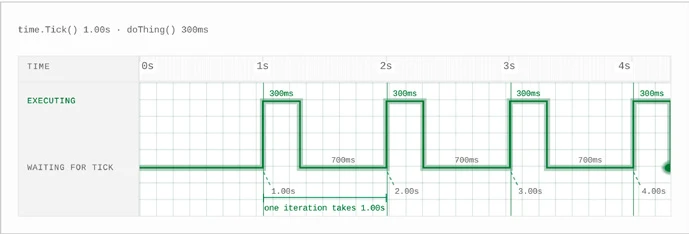
The ticker fires once per second, leaving 700ms after 300ms of work.

The ticker’s one-second schedule keeps advancing while doThing() runs. Here, 300ms of work leaves 700ms before the next tick, so each execution still starts 1 second after the last. If the work takes longer than the interval, the ticker cannot keep the loop on time.

The compact for range syntax above waits for each tick and then runs the body of the loop. We can write those same steps explicitly: first store the stream of ticks in tick, then use <-tick to wait for the next one:

                interval := 1 * time.Second
tick := time.Tick(interval)
for {
    <-tick
    doThing()
}
              

This is the same as above. But both implementations have the disadvantage that on the first iteration, we wait for the interval up front before calling doThing. In the time.Sleep approach, we did the thing and then waited.

This is easy to remedy: we can reorder the operations inside the loop.

                interval := 1 * time.Second
tick := time.Tick(interval)
for {
    doThing()
    <-tick
}
              

Now it will do the thing, wait until the next second, do the thing, wait until the next second… and the ticker can keep things as close to on-time as possible, regardless of how long doThing takes to run. That solves it, right? (Right?)

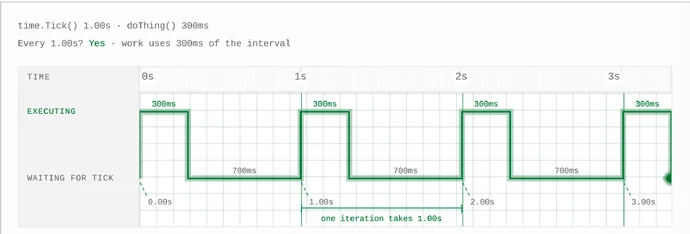
Work begins immediately, then stays on the ticker’s one-second schedule.

Moving doThing()above <-tick makes the first execution happen immediately at 0s. The ticker is already counting toward 1s, so after 300ms of work the loop waits the remaining 700ms and subsequent executions stay on its one-second schedule.

Lots of things doing the thing repeatedly forever

Let’s suppose doThing calls out to some network service, like requesting work, or uploading chunks of job logs. Let’s also suppose that copies of the loop are running in a large fleet around the world.

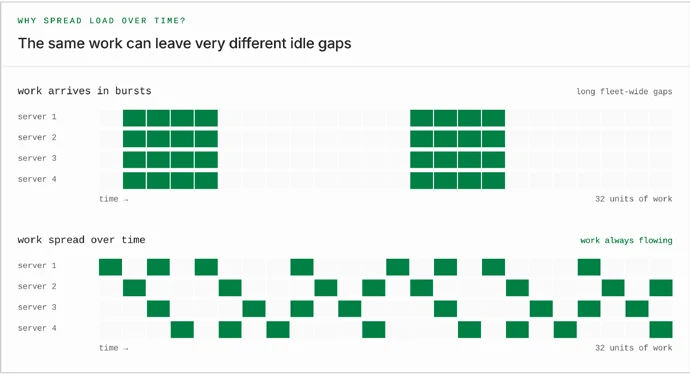
Ideally we want the load on the servers to be spread across time evenly. This is so that servers aren’t sitting idle (we have to pay for them whether or not they are used, so may as well use them) and to avoid overload (through surges of requests).

The same 32 units of work arrive in bursts above, and evenly staggered below.

Both timelines contain exactly 32 units of work. In the first, the whole fleet has nothing to do for long stretches. Spreading arrivals keeps useful work flowing without creating any more work.

We might hope that the load will just naturally spread itself across time evenly. After all, not all copies of the loop will be started at the same time. If that’s true, then we would expect the load to be spread out a bit randomly within the first interval and then remain somewhat periodic (repeating in time), changing in shape as instances are added and removed.

An evenly staggered fleet repeats its activity pattern every 1.15 seconds.

A perfectly periodic activity graph: what we would expect from a large fleet of agents started at evenly spaced offsets across the first cycle. Each 1.15-second cycle combines 0.15 seconds of work with a one-second sleep.

Hope is not a strategy.

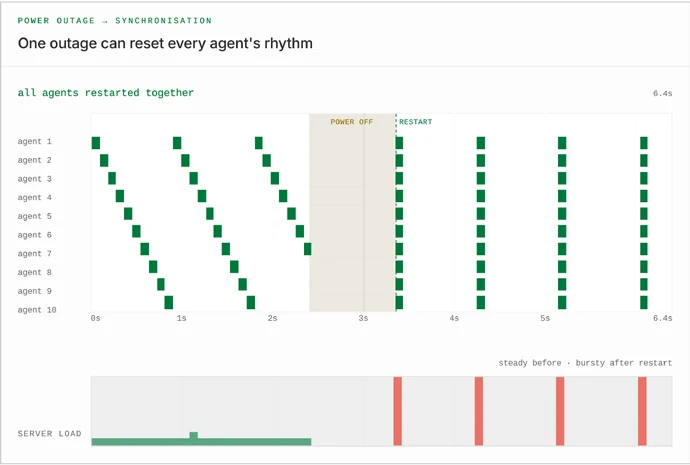
From time to time, though, large groups of agents will synchronize. Suppose there is a power outage at a data center running lots of agents. We can expect they will all start up again at about the same time.

After a power outage, previously staggered agents all restart together.

Before the outage, request marks are staggered. When power returns, every agent starts its loop from the beginning at the same moment. And the marks line up.

Or suppose (more likely) that there is a network blip that causes a large group of agents to reconnect to Buildkite at the same time, causing the loops to start at the same time as a knock-on effect.

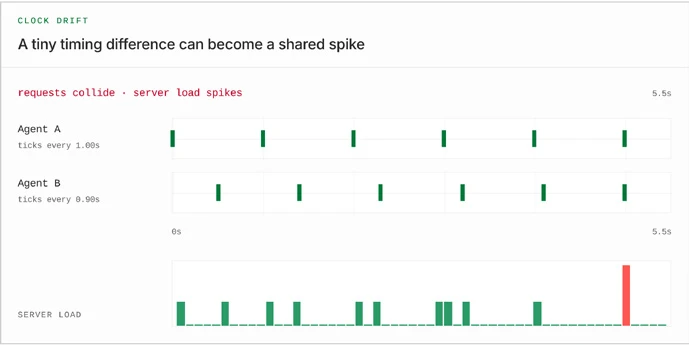
Another reason is clock drift: some system clocks run slightly slower, some slightly faster, and over time they will drift in and out of synchronization with one another.

Clock drift slowly moves requests into alignment.

Thirdly, a reason to avoid the time.Sleep approach in particular is that when lots of agents do the thing at the same time, the servers will be bogged down trying to handle them all, so they will tend to finish their requests around the same time, and when the interval between them is fixed (with time.Sleep) that means they will all start again at the same time.

(Footnote: Sometimes the opposite happens. Computers are hard.)

We must counteract the tendencies for loops to spontaneously synchronize.

“I know! Let’s wait a random amount of time!” This is called jitter. The way in which jitter is added is important.

Jittering a sleep loop

Suppose for a second we still used time.Sleep in the loop. The easiest way to add jitter (with some big drawbacks that we will get to shortly) is to change the sleep interval to some random amount of time:

                interval := 1 * time.Second
for {
    doThing()
    time.Sleep(rand.N(interval))
}
              

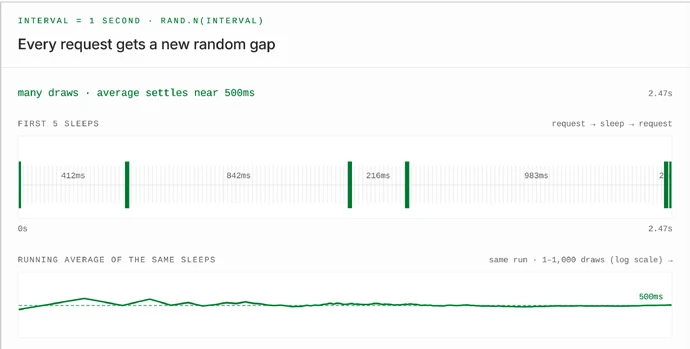
rand.N chooses a uniformly distributed value from zero (inclusive) up to the provided limit (exclusive). Because Go durations are numeric values, passing interval gives us a random duration between 0 and 1 second.

Random sleeps between zero and one second average about 500ms.

Sleeping a random amount between requests. The five visible sleeps average 495ms. Extend that same random run to 1,000 sleeps and its average is 502ms, close to the expected 500ms midpoint.

Every duration in the range is equally likely. The midpoint between 0 and 1 second is 500ms, so over many iterations the sleeps average 500ms.

A short run, like the one above, can average higher or lower. If we assume that doThing takes no time to run, the loop therefore averages one iteration every 500ms. To make the time between runs average 1 second, we need to double the upper limit:

                interval := 1 * time.Second
for {
    doThing()
    time.Sleep(rand.N(2 * interval))
}
              

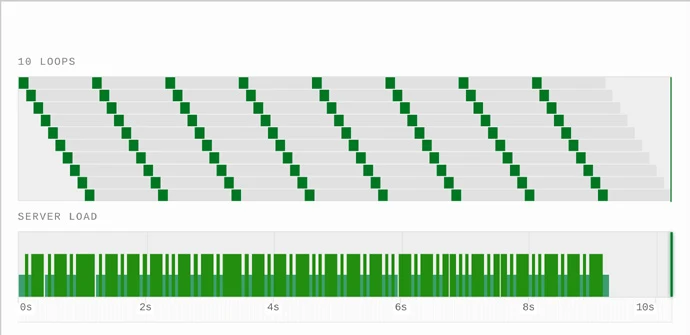
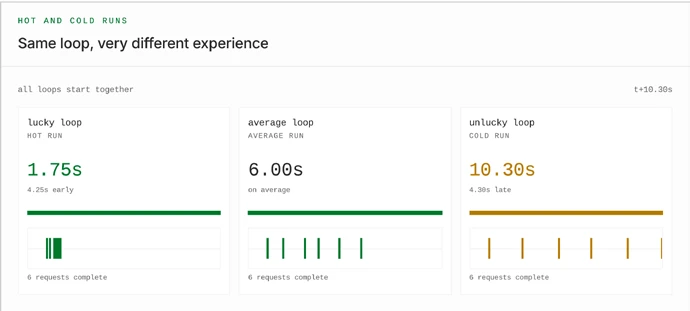
There are two things to understand about this approach. The first is a fact every gambler knows: there are “hot runs” and “cold runs”. In this context, “cold runs” happen when the random number generator (RNG) sometimes generates several high numbers (longer intervals) consecutively, and “hot runs” happen when the RNG generates several low numbers (shorter intervals) consecutively. The behavior of the random-sleep loop is reasonable on average, but it is inconsistent. Hopefully, in aggregate, hot and cold runs aren’t a problem for the backend. But from a user experience perspective, while we may be willing to accept a longer interval from time to time, having long intervals repeatedly would suck. In the case of Buildkite agents, they would take longer to pick up new jobs and make new logs available, so we want to avoid that.

Six iterations finish in 1.75s, 6.00s, or 10.30s depending on the random sleeps.

All three copies of the loop run the same code six times. A lucky sequence finishes in 1.75s, an average sequence in 6.00s, and an unlucky sequence takes 10.30s, a difference caused entirely by the random sleeps.

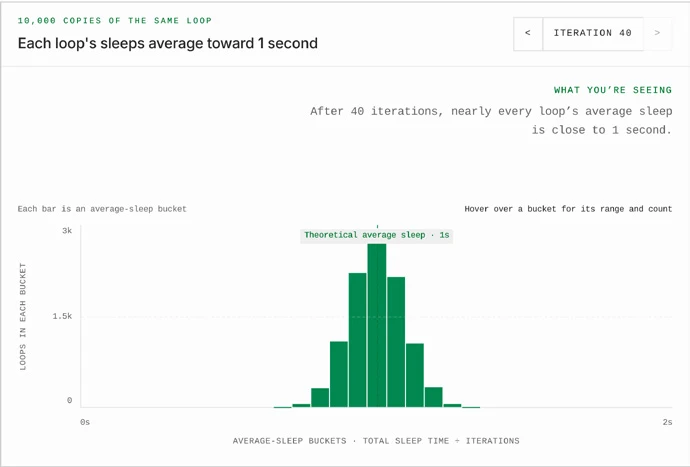
The second is a bit more statistical. A single random sleep could be anywhere between 0 and 2 seconds. But as each copy of the loop repeats, its short and long sleeps begin to balance out. The simulation below adds up the time each loop has spent sleeping, then divides it by the number of iterations. After the first iteration the results fill the entire range, but after many iterations they gather around 1 second.

As iterations increase, average sleep durations gather around one second.

The 0–2 second range is divided into 31 buckets. Each bar is one bucket, and its height counts loops whose total sleep time divided by their iterations falls within that bucket. This is not a graph of server load.

Why do random sleeps add up this way?

The expected time of the Nth call, after the loop starts, is (N−1) intervals, since the first call happens immediately. Each sleep interval is a random variable that is independent, identically distributed, and has finite variance, so the Central Limit Theorem tells us that, as N grows, their sum becomes approximately normally distributed (with the mean being the sum of the means, etc.). The effect remains even if we stop assuming doThing takes 0 time: it clearly takes some time, but we can model it as having its own non-negative distribution with finite variance, and therefore add (N−1) times its mean to the expectation of the sum, and so on.

Jitter + ticker

We can effectively solve the “hot/cold runs” problem by combining a random sleep with the Ticker loop:

                interval := 1 * time.Second
tick := time.Tick(interval)
for {
    time.Sleep(rand.N(interval))
    doThing()
    <-tick
}
              

First, we sleep a random amount of time. Then we do the thing. Then we wait for the ticker. And then return to the top of the loop.

The effect of this is: for each time interval, doThing will happen at a random time during that interval. This may be slightly easier to see if we rearrange the loop and introduce a little extra channel that exists solely to skip the ticker on the first interval:

                interval := 1 * time.Second
tick := time.Tick(interval)
first := make(chan struct{}, 1)
first <- struct{}{}
for {
    // Wait on each tick, except the first iteration.
    select {
    case <-tick:
    case <-first:
    }
    time.Sleep(rand.N(interval))
    doThing()
}
              

This example is very close to how the Buildkite Agent log processing loop was implemented for most of 2025, after a January change introduced jitter and ticker-based timing.

The “hot/cold runs” problem is harder to run into here. Suppose the RNG produces a string of larger intervals (close to 1 second, in this example). Because of the ticker, the Nth loop iteration always begins N seconds after the loop begins (and if not, the ticker internally adjusts). So while a “run” of long intervals might introduce a longer than average gap immediately before the run, within such a run the inter-event time is still around 1 second.

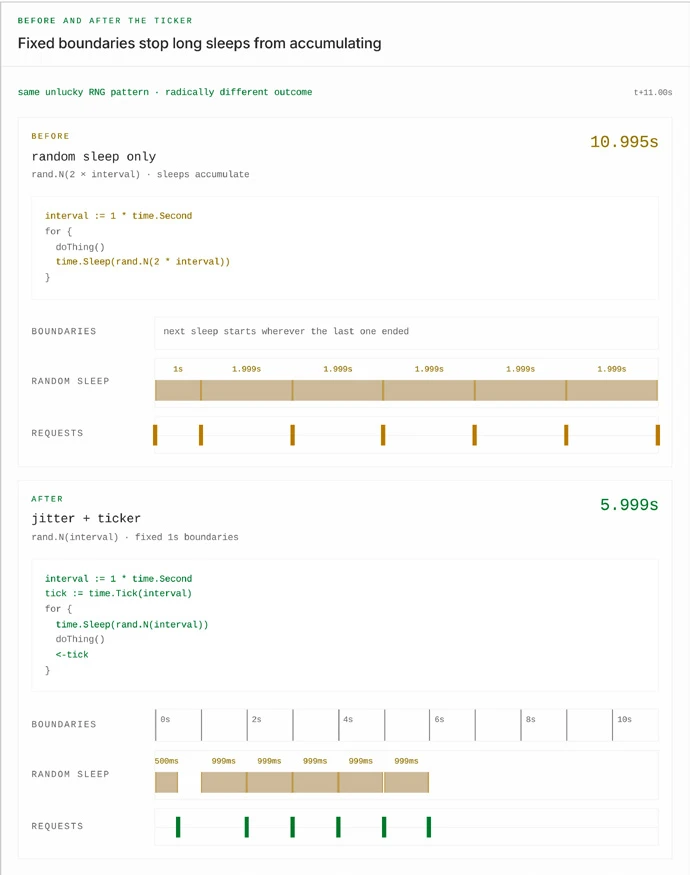
A fixed ticker prevents long random sleeps from accumulating.

Both loops hit the same unlucky pattern: one half-range draw, then five draws at 99.9% of the maximum. Before the ticker, those six sleeps accumulate and the seventh request arrives at 10.995s. Afterward, fixed one-second boundaries hold the sixth request near 5.999s.

The worst-case performance is now an alternating long/short pattern. Suppose the RNG rolls 1s, 0s, 1s, 0s… In that case, there will be alternating gaps of ~2s and ~0s. Not ideal, but the average load in terms of backend requests is consistently 1 per second.

But why jitter the whole interval?

With the jitter + ticker loop, we’ve greatly mitigated the problems with the random-sleep loop, but we still have the worst-case of alternating long/short patterns, meaning we could potentially have as little as 0x or as much as 2x the chosen interval between requests.

Can we reduce this variability somehow? We certainly want to consider the 0x case. If the loop exists to repeatedly request jobs to run, we could model the expected number of jobs available as being proportional to time spent waiting. The less time spent waiting, the fewer jobs available. If we generated a 0 interval, then waited 0 time and immediately tried to fetch a new job right away, then we expect 0 new jobs to have been made available in that interval. So such a request is expected to be a complete waste of effort. Similarly, if we model a job as producing a steady stream of log output, creating a new chunk right away would also probably waste all the overheads that go into making the request, because we expect there to be no new log output.

One possible and very tempting solution starts like this: “Aha, why not only jitter for half the interval?”

                interval := 1 * time.Second
time.Sleep(rand.N(interval / 2))
              

“Or for some fixed duration that doesn’t vary with the interval?”

                // This stays at 100ms even if interval changes.
jitterWindow := 100 * time.Millisecond
time.Sleep(rand.N(jitterWindow))
              

“That way we can bound the time between requests.”

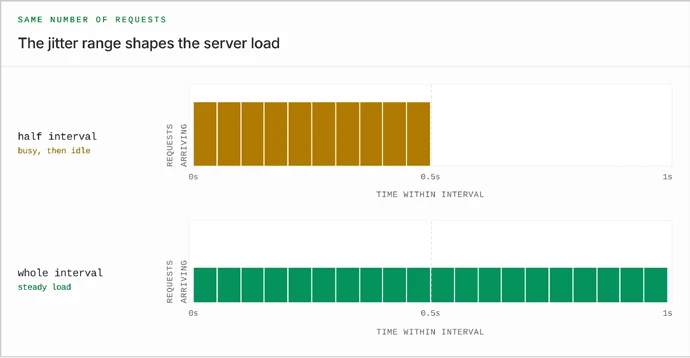
The downside is, again, the tendency of physical effects such as clock drift or power outages to cause loops to synchronize. Throwing hope out the window again, let’s assume a bad case where the tickers for a large group of loops all fire at the same time. Jittering for half the interval would spread the requests out better than running the request right away… but would still tend to concentrate requests from the large group within one half of the interval, which could be a load problem. The rest of the interval would have fewer requests, leading to under-used server capacity.

Half-interval jitter concentrates requests into ten buckets; whole-interval jitter spreads them across twenty.

Each row divides one second into 20 time buckets, and each bar's height represents the requests arriving in that 50-millisecond bucket. Half-interval jitter packs every request into the first 10 buckets, making those bars roughly twice as tall while the second half sits idle. Whole-interval jitter spreads the same requests across all 20 buckets, producing a lower, steadier load.

Jittering sometimes

Can we do better than that? Perhaps we want the requests to be much more regular most of the time, and we only want to spice things up the minimum amount (let’s call this the “English cooking” of jitter).

At this scale, we can add a little jitter every so often to a fixed ticker loop to keep the agents spread out a bit. A tiny sprinkling.

The idea is, run a fixed ticker loop for some finite length of time, then “re-offset” that loop by a random amount every so often:

                interval := 1 * time.Second

// Every 32 iterations, jitter a bit.
for {
    time.Sleep(rand.N(interval))
    tick := time.Tick(interval)
    for range 32 {
        doThing()
        <-tick
    }
}
              

This should be pretty resilient to clock drift, as long as the clocks aren’t drifting too quickly. Its average request rate is slightly less than 1 per interval: each batch makes 32 requests over 32 ticker intervals plus a random sleep that averages half an interval.

You’ll notice, though, that this is a fixed-length ticker loop within a random sleep loop. So what about that Central Limit Theorem mumbo-jumbo that applies to random-sleep loops? That’s still valid, and if we wanted to, we could make mathematical claims about how, after a very long time, the timing of the Nth iteration of the inner loop is approximately normally distributed, etc.

If that’s a problem, we can fix it by… using the fixed ticker loop inside another jitter + ticker loop.

                interval := 1 * time.Second

// Each outer iteration covers 32 inner intervals.
jitterTick := time.Tick(32 * interval)
for {
    time.Sleep(rand.N(interval))
    tick := time.Tick(interval)
    for range 32 {
        doThing()
        <-tick
    }
    <-jitterTick
}
              

For a real-world implementation of this, see the Buildkite Agent’s log-processing loop.

Sleeping at scale

Jitter is often described as adding randomness to a loop. But where the randomness goes, how much we add, and how often we add it all change the result.

For one loop, those differences might not matter much. But when you run thousands upon thousands of copies of that loop, they determine whether work arrives smoothly or in spikes, and whether each loop keeps a useful pace or sometimes runs twice in quick succession.

Randomness is not useful by itself. We could spread requests perfectly and still make each agent unpleasantly inconsistent. Or we could keep each agent perfectly regular and allow them all to synchronise. The trick is deciding where the irregularity is useful.

At sufficient scale, even sleeping requires some coordination.

Originally published August 2026 on buildkite.engineering.

End

Back to story headline ↑
Opportunities & public noticesPrint edition / 07

Classifieds

Buy ad space. Or CI. Preferably CI. Our sales team is ready when you are.

Careers at Buildkite

The CI platform for engineers that need full control over their pipelines.

Build what your software demands. At any scale.

Why build at Buildkite?

  1. Build for every frontier team
  2. Have a real impact
  3. Bring your weird
  4. Own your work
  5. Scale your career

There’s never been a better time to build at Buildkite.

Buildkite’s green kite at the heart of a circuit board

Help wanted

As advertised in Vol. I.
See careers for current openings.

Cloud efficiency engineer (AWS/FinOps)

Own Buildkite's cloud costs end to end

Trace COGS to root causes, build the models, ship the fixes, prove the savings landed. Report to the VP Eng Platform. Partner with the CTO, Platform, Data, and Finance. No cutting corners on reliability. Cut the bill on stealth mode, so only the CFO notices.

ANZ region / Explore careers ↗

Senior engineer — Agents

Own the open-source Buildkite Agent

It’s THE THING running every build, everywhere Buildkite's CI runs. Critical infrastructure sitting between deep systems work and fast-moving AI agents. Can't be paused, must keep shipping. Join a sharp, opinionated team, and own something real within months

ANZ region / Explore careers ↗

Staff engineer — DevX

Lead DevEx at Buildkite

CI, build tooling, deployment paths, agentic coding. Your mission: Double R&D output per engineer, across ~80 engineers in 12 months. Your fixes compound twice, because they land in our product too. This is internal work, not advocacy. Your audience is the engineer whose build you just sped up.

ANZ region / Explore careers ↗

Staff engineer — Releases

Build Buildkite's release control plane

A canonical release model, reliable ingestion, an immutable evidence trail powering DORA metrics and policy gates. Then extend it into progressive delivery, canaries, blue/green, and rollback. Hands-on technical leadership, driving architecture and strategy, integrating with existing CD rather than replacing it.

ANZ region / Explore careers ↗

Account executive

Own the full sales cycle for enterprise accounts

High-value deals. Multi-stakeholder relationships. Build account strategies that stick. You’re shaping revenue outcomes, not just hitting quota. High autonomy, high stakes

US region / Explore careers ↗

Word on the street

Remote, global, fun

“Being fully remote means our team is based all across the globe. That gives me two things: the flexibility I need as a parent and the chance to work with an amazingly talented and diverse group of people. There's a certain quirkiness here I haven't found anywhere else, and that's exactly what makes Buildkite special. We work hard, we achieve a lot, and we have a lot of fun along the way too.”
Jodie Richardson
People Ops Specialist

Fast + efficient debugging with Buildkite

“I like that Buildkite runs fast and makes it easy to debug issues with my MCP. It helps make sure that my tests are passing for a merge of my PRs. Also, I appreciate that the setup was easy, and using the MCP through Cloud Code allows it to quickly figure out what the issues are, making my PRs merge faster.”
Sungum S.
Validated G2 review for Buildkite

Public notice

A San Francisco bus with Buildkite’s “You deserve better CI” advertisement
Green lights on your build (and your commute) #BETTERCI
Photo: Irina Nazarova, CEO, Evil Martians

Don’t see the right fit?

Buildcrew

Build what’s next…

Be the first to know when a position opens up. Share your CV, portfolio website, or LinkedIn profile.

Hiring engineers, product, designers, sales and sales engineering, marketing, devops support, operations, and people.

ANZ region, San Francisco, US West Coast, United Kingdom, Ireland, Poland

Explore all open roles ↗

Startup with benefits

Monthly Bikkie budget · Health insurance · 401(k) · 20 days PTO · 10 days sick leave · 16 weeks primary parent leave

And everything you need to build and do your best work.

Join us! ↗
New merch exclusive. You get first dibs.Buildkite’s metal-inspired wordmark T-shirtShop.buildkite.com ↗
For the terminally curiousPrint edition / 08

Astrology

By Mel Maehara

Your stars.
Your stack.
Your Tech Week.

Libra

September 23 – October 22

Tech Week hits during your season, which explains everything. You'll get invited to four events happening at the same time and agonize over which one has the better crowd, better snacky-snacks, better odds of a good conversation about system design. You'll pick correctly (obviously), because reading a room is basically your whole personality. Someone will ask your honest opinion on their startup's pitch. You'll find a kind way to say no, a “no but...” Venus favors diplomacy. Your G-cal does not.

Scorpio

October 23 – November 21

You already know who's raising, who's not, who's quietly getting acquired before it's announced, and which “stealth startup” is just three guys and a Notion doc. Tech Week is just a week where everyone else catches up to what you clocked at the end of Q1. You'll work a room without seeming to work it at all, extract more information than you give, and vanish from the after-party so quietly people will wonder if you were ever there. You were. Wait... were you? Your commit messages are terse and a little intimidating. So is eye contact with you right now. Nobody’s mentioned it. Everyone’s noticed.

Sagittarius

November 22 – December 21

You signed up for every Tech Week event within walking distance and will attend none of them, because you found a better one by wandering into the wrong building. It’ll be a birthday party for someone’s cat hosted by a Series A founder catered by State Bird Provisions. That's just how your week goes. You'll end up debating with a stranger at 1am whether an agent can truly consent to a PR and mean every word. Monday you'll ship something reckless straight to prod because it felt “right.” It'll mostly work. Jupiter's optimistic about your rollback plan. You don’t have one and the guy on call tonight is about to have a very formative night.

Capricorn

December 22 – January 19

While everyone else is out networking, you're quietly closing a deal. The G-cal invite says “Quick Sync,” but it’s in fact an acquisition. Tech Week is amateur hour for you, you did this in high school, over WhatsApp, without the lanyard. You'll show up to exactly one event, the one with actual decision-makers in the room, extract value, and leave before the slide that starts “so, a little about us.” Saturn respects your restraint. Your term sheet respects your patience even more. Your calendar respects nothing since you’re booked till sometime in 2028. Hopefully there will still be water and compute. On a whim, you buy copper. A lot of copper.

Aquarius

January 20 – February 18

You've already built the thing everyone at Tech Week is currently pitching, six months ago, alone, for fun, and open-sourced it out of principle. You’re one of the few people in tech left with a full set still intact. You'll wander into a panel titled “Do Agents Dream of Passing CI?” and quietly know more than the panelists. Someone will try to recruit you into their startup, which on closer inspection is a cult with a keycap keychain table. You're not interested. You have your own thing, thanks. And grab a keychain anyway. Uranus makes you allergic to consensus. The only stars you trust are the ones in your repo, and they don’t lie.

Pisces

February 19 – March 20

You can feel a flaky test coming before it fails, and this week that instinct is doing double duty on both your pipeline and the vibe of every party you attend. Tech Week overwhelms you. Too many rooms, too many people pitching AI employees like they’re not a scheduled script injected with personality+1. You'll lie about “just stepping out for a call” and find the one quiet corner behind a ficus that’s clearly rented for the event. Someone who looks as done as you feel, but clearly looking to hook up, will open with, “Wait, are you pre-seed or are you a person?” This will be the best conversation of the week. Neptune blesses your intuition.

Aries

March 21 – April 19

Mercury retrograde has nothing on your commit history this week. You'll ship straight to main because reviews are for people who doubt themselves, and honestly, the pager can build character. Tech Week puts you in nine rooms with open bars and zero patience for small talk, which suits you fine. Someone will pitch a fax machine, but it’s on the blockchain. Another pitches Venmo for divorce. A third wants you to feed a Tamagotchi compliance training to keep it alive, and somehow that’s the one that gets you talking. There will be a hottie, with an uncanny semblance to Elizabeth Holmes, from a startup that’s just a Magic 8 ball with a Series A. Nod, take the cards, forget them by Thursday. Well... keep the hottie’s number, you never know. Your ruling planet is Mars, your ruling emotion is contempt for staging environments.

Taurus

April 20 – May 20

You have not touched your dependencies since 2019 and you are, once again, correct. While everyone else spends Tech Week hopping rooftop parties in the Mission, you're home, agent running, pipeline green, blissfully unaware there's a conference happening at all. The stars suggest one (1) mixer, purely for the catering. Someone will ask your take on "the new model," as if there's only ever one. You'll answer like there is only one, confidently, correctly, and without having read a single changelog. Stability is your love language and nobody's stopping you. Not today. Not ever. How bullish of you.

Gemini

May 21 – June 20

Dozens of Slack threads are on fire and need you RN, plus two live demos and a founder pitch, all before lunch, all somehow you. Tech Week is basically your Super Bowl: a city full of strangers who want to talk about their stack (real or aspirational, the PoC that's still a PoC of a PoC). You'll charm a VC, confuse an intern, tell legal the indemnification clause is "probably fine," and give completely different opinions on Rust to four separate people, all sincerely. Your build will be green because you haven't stopped moving long enough to break it. Mercury's right at hand. So is your fourth cold brew.

Cancer

June 21 – July 22

You didn't want to go to the after party, but your team's Slack channel guilt-tripped you into it, and now you're in a warehouse in Dogpatch nursing a can of something local, listening to yet another stranger explain their workflow automation. You will hear “agentic workflows” used 29 times before you finish that beer. You'll leave early to check on a flaky test that's been bothering you since Tuesday. It's fine. It was always fine. You just needed to know. The moon's in your sign. Your CI dashboard is feeling it too.

Leo

July 23 – August 22

You're doing a talk this week and you already know it's the best one on the schedule (huzzah!). Tech Week crowds gravitate to main character energy, and yours just triggered a rolling blackout in the Mission. Strong opinions on the new model release and stronger opinions on your own architecture decisions. Someone will challenge you during the Q&A with a “let’s double click on...” they’ve been saving all week. You'll let them finish before ending them. The sun favors you today. Your badge photo is doing numbers. And your pipeline, like your ego, never fails silently.

Virgo

August 23 – September 22

While the rest of the city is out drinking overpriced cocktails and talking about "the future of software," you're quietly refactoring something nobody asked you to touch, because it bothered you. Tech Week panels will describe things you built two years ago as "emerging." You'll say nothing, correct exactly one person, and go home to write test coverage nobody will read but you. Someone will thank you for it in eight months, without knowing why. Mercury rewards precision this week. So does your linter. Finally.

The receiptsPencils at the ready

Builders of Buildkite

Print edition / PDF ↓

Match the clues to the companies. Click a square or a clue, then type. Hover over a clue to preview its squares. Click an intersection again (or press Enter) to switch direction. Arrow keys move; Backspace erases.

1 downElon's AI venture

Scroll the grid to reach more squares on smaller screens.

across

down

Editorial & art

Editor
Mel Maehara
Contributing writers
Josh Deprez, Patrick Robinson, Mark Wolfe
Staff brand designer
Jenn Piatkowski

Marketing & sales

VP of Marketing
Mitch James
Senior content engineer
Matt Mejia
Dev marketing specialist
Srishti Singh
Staff GTM engineer
HeeGun Eom

About this edition

Published exclusively for SF Tech Week 2026 by Buildkite Pty Ltd. Originally printed in San Francisco.

The print issue is typeset in LTC Goudy Text Pro, Sorts Mill Goudy, Ambroise Std and Input Mono. This web edition pairs the original masthead with Sorts Mill Goudy, Bodoni Moda and Departure Mono.

Take a copy of the print edition ↓

The fine print

No part of this publication may be reproduced, distributed or transmitted in any form or by any means, without the prior written permission of the Publisher, except in the case of brief quotations embodied in critical reviews and other non-commercial uses permitted by copyright law.

For questions, contact mktops@buildkite.com.
Please don’t though.